
Two records can split the same company's service history: one receives recent requests while the other holds older locations and work orders. Merging brings relationships under a retained customer and preserves the source record as history. This guide explains how to prepare that decision in ProFieldX. Screenshots contain fictional records, not a real customer migration or operation. The captured interface is in Brazilian Portuguese.
Confirm both records represent the same entity
Compare the name, contact information, personal or company details and service context. A shared phone number, abbreviation or similar name is not enough to establish duplication. Branches, sites and businesses using a central service contact require checking how the relationship is recorded and who receives each service.
The Salesforce educational material in the references distinguishes accidental duplicates from intentional separations. Ask whether both records represent the same customer. If that still needs confirmation, keep them separate while seeking context. Merging customers is a different decision from linking a request or organizing service locations.
Choose the duplicate and the customer to retain
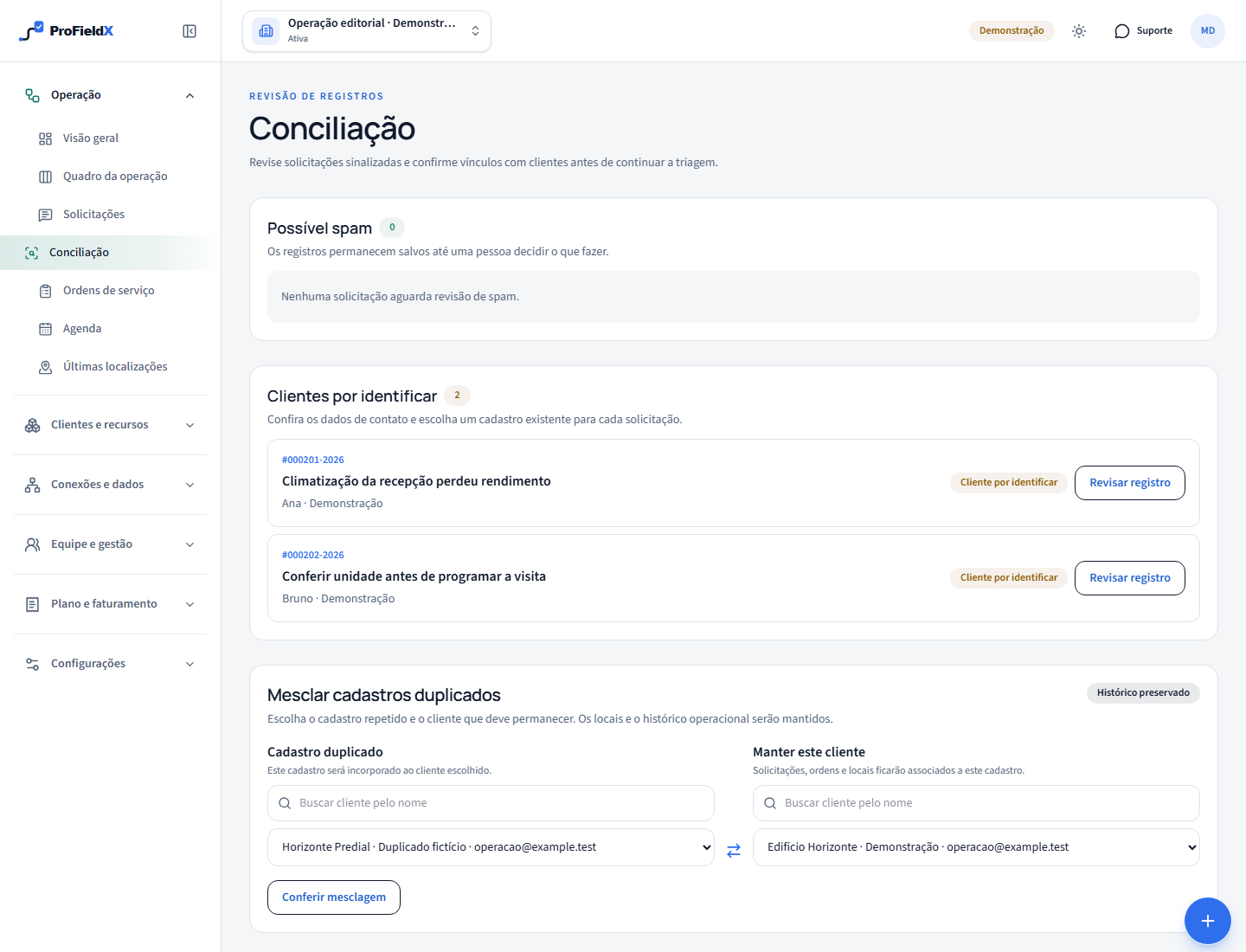
Open Operations → Reconciliation and find Merge duplicate records. Under Duplicate record, search for and select the source to incorporate. Under Keep this customer, choose the destination that will remain active. You need authorized access and two distinct customers within the same organization. Check the names in both positions before proceeding.
In our fictional example, Horizonte Predial · Duplicado fictício was created during an import and received a work order and a request. Edifício Horizonte · Demonstração is the record the team has chosen to retain. Make that choice based on correct identity and existing information. The newest record is not automatically the best destination.
Read the preview before authorizing the transfer
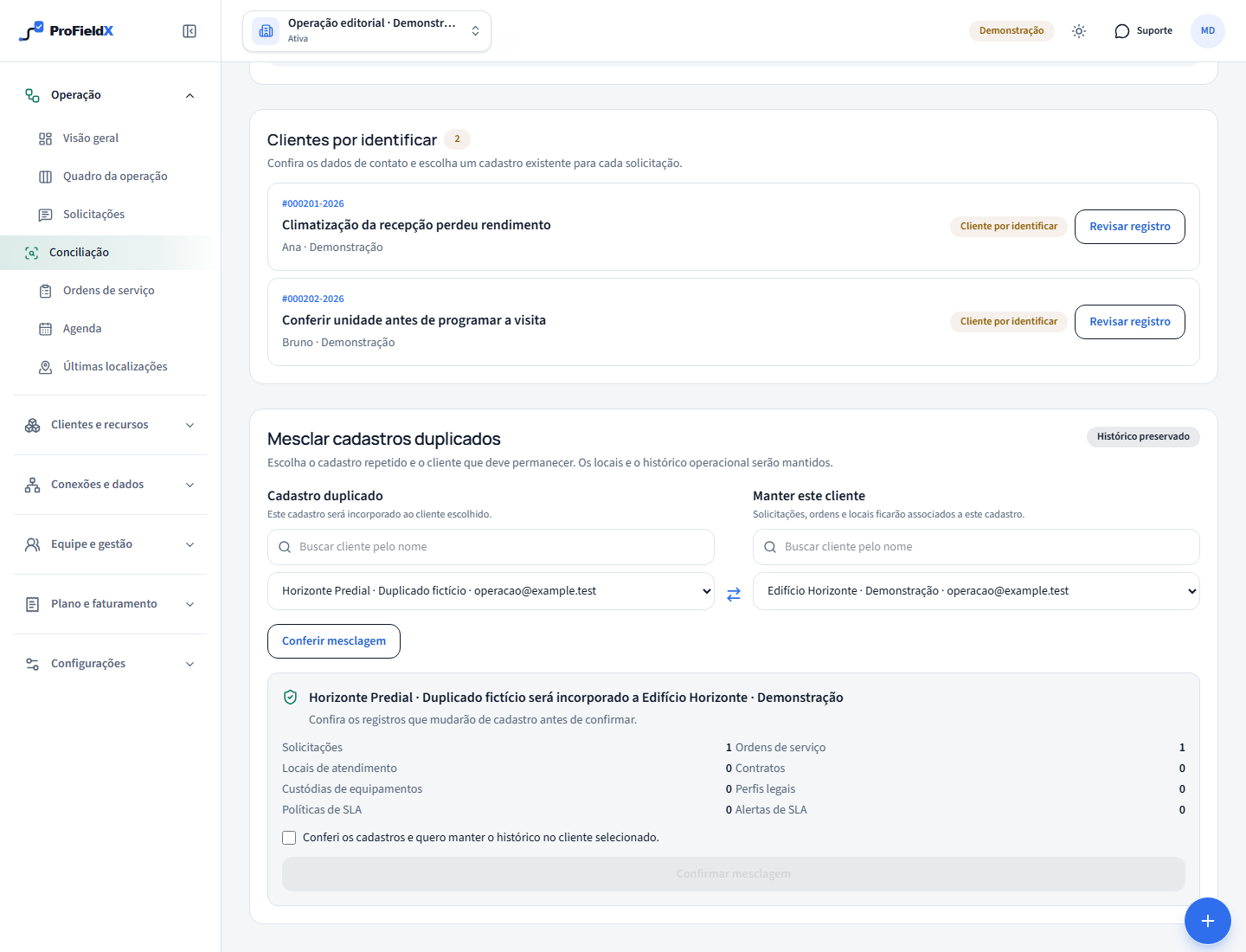
Choose Review merge. The preview identifies source and destination and shows counts of affected relationships, such as requests, work orders and locations, plus contracts, equipment custody and settings where present. Read those counts alongside the context of both customers. A preview without blockers allows confirmation but still requires your decision.
Differences in legal profiles, SLA settings or custom fields can block a merge. Review the indicated information and request another preview after resolving the difference. Do not delete valid information just to remove a blocker. If you change either selected customer, review the result again before confirming.
Understand what is preserved
The destination customer remains active. Locations and compatible operational relationships move to it, while the source stays archived for historical consultation. Locations retain their identity, preserving their connection with existing service records. Check history and locations under the retained customer after the operation.
Existing destination information is preserved according to merge rules, and complementary information can fill gaps. Where applicable, the preview also explains image handling. This does not replace a customer data quality review. Treat confirmation as a permanent reorganization of records and check identity carefully before submitting.
Confirm and check the retained customer
Once you have reviewed a preview without blockers, select the displayed confirmation and choose the merge action. Wait for the result. Open the retained customer and check the expected locations, requests and work orders. The incorporated record no longer accepts new associations; use the active customer for future service.
If another person changes the information while you review it, or a difference appears during confirmation, check the current state and generate a new preview. A communication failure calls for verifying the outcome before resubmitting. Do not treat an old screen as proof that the records are still separate.
Reduce repeated duplication at intake
After resolving a duplicate, review how it arose. For the next import, inspect the source identifiers and relationships. In daily service work, search for the customer before creating another record. Form submissions should go through customer identification whenever Reconciliation indicates it is needed.
Agree who reviews ambiguous cases and retain the context colleagues need. A naming convention may help search, but each record must continue to represent the correct entity. To continue service after cleanup, return to the operations board and check the next decision for each request or work order.
Sources
- Identify and Manage Duplicate and Disconnected RecordsSalesforce Trailhead — educational material on duplicates and false positives
- How to reconcile requests with customers in ProFieldXProFieldX Editorial — identification before triage
These sources provide context for this guide. Applicable requirements depend on the activity, location, and current rules; consult the responsible authorities and qualified professionals.