Prepare a work order that explains the job
Before opening the calendar, make sure the work order is open or in progress. A service request still in triage must be reviewed and approved before conversion. Check the summary, priority, description, customer, and service location. For an off-site appointment, the linked location provides the address recorded when the work order was created; confirm it is still correct before arranging the visit.
Give the team enough context to recognize the request and prepare: reported symptom, equipment, access window, and an operational contact when needed. A work order organizes the job but is not a technical procedure. For higher-risk work, follow the organization's approved procedures and authorizations instead of improvising safety instructions in a short summary.
Set the service window
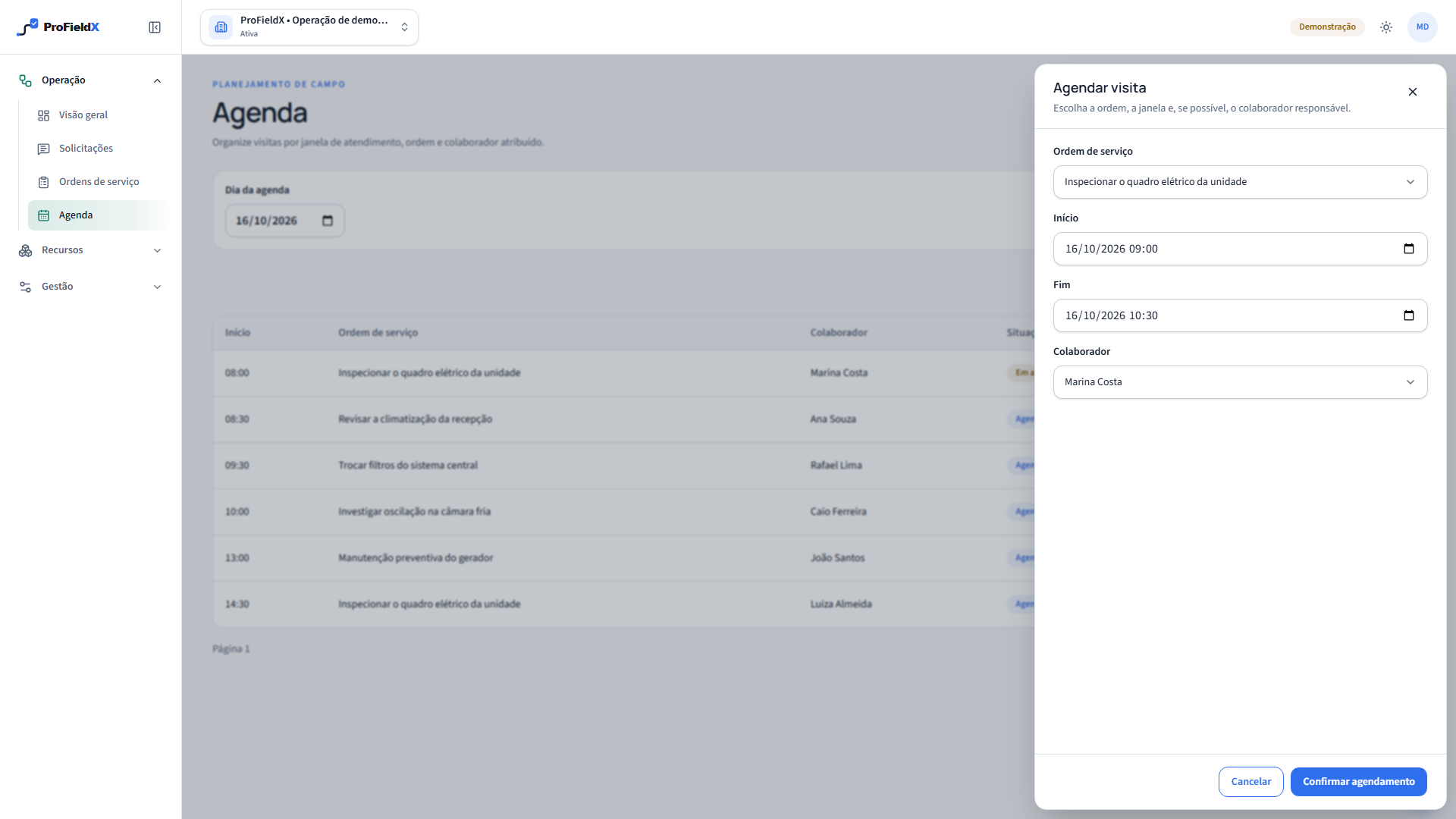
Open Agenda and choose Schedule visit. Select an open or in-progress work order, enter a start and end time, and confirm the schedule. The end must be later than the start, and a new visit must begin in the future. Calendar times follow the organization's time zone. Check the local date and time before saving, especially when the team and service site operate in different time zones.
You can create a visit without an assignee when the roster is not final. Agree who will handle the appointment and update the assignment later. One work order may have multiple visits — for example, an initial diagnosis and a return trip — and each visit keeps its own time window and status.
Choose an assignee with the full context
When you know who will go to the site, assign a registered employee. Before confirming, compare the time window with the roster, location, access, required skills, and travel conditions. ProFieldX prevents overlapping visits assigned to the same person. This check covers the times recorded in the calendar; it does not plan routes, account for traffic, assess technical qualifications, or confirm availability outside the schedule.
Group jobs only when operational planning confirms it makes sense. A longer time window does not guarantee enough time for diagnosis, work, and documentation. If the appointment depends on restricted access, equipment downtime, parts, or customer accompaniment, coordinate those details before dispatching the team.
Check the visit in the calendar
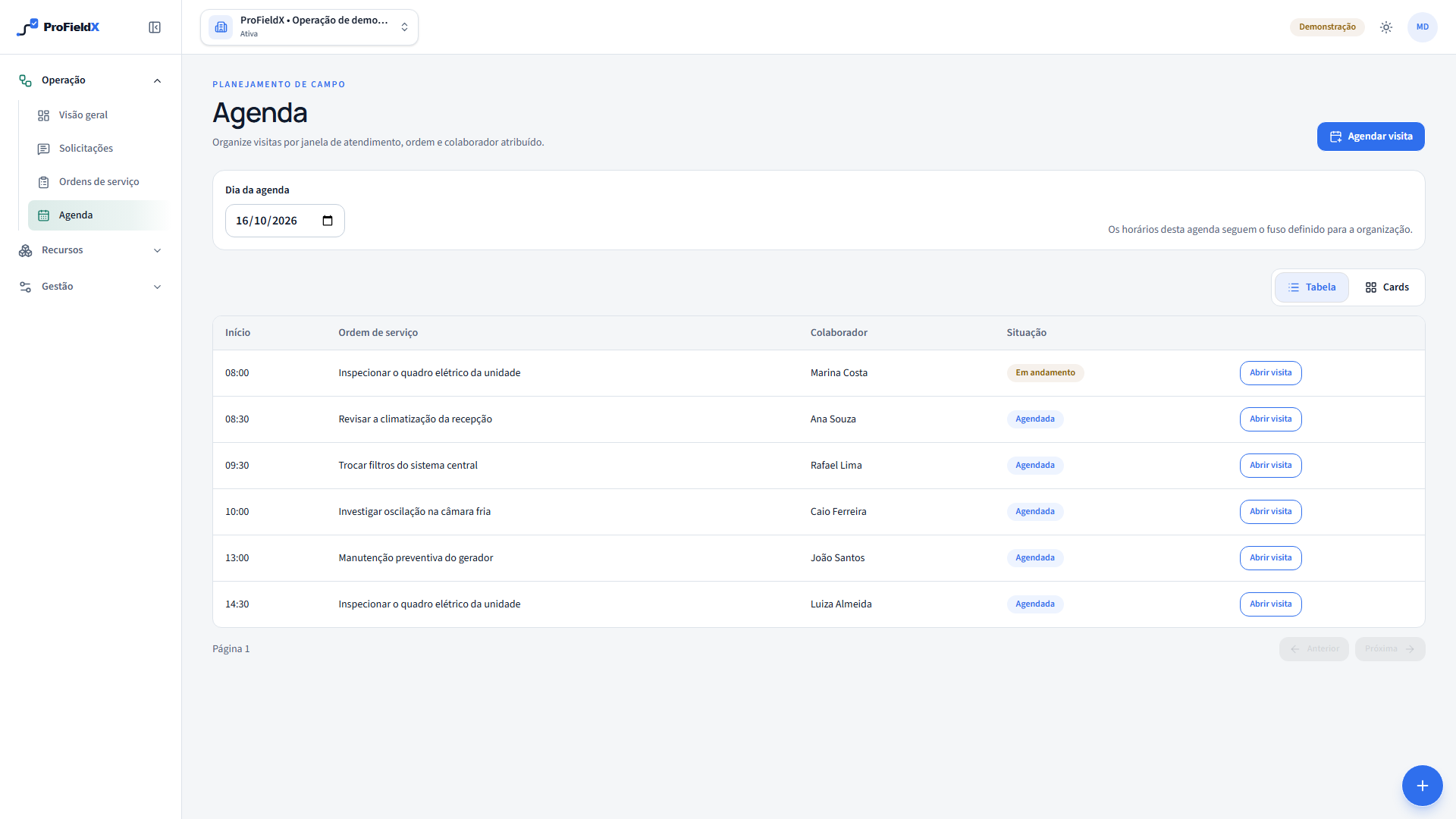
After saving, filter the calendar to the planned day. The visit row shows its time, work order summary, assignee, and status. Open the details to verify the start, end, related order, and assignment. If something is wrong, use the available edit flow to adjust the time or assignee while respecting any schedule conflicts the product reports.
The calendar records internal planning. ProFieldX does not automatically confirm appointments with customers or track travel in real time. The team still needs to communicate the time window, changes, and access instructions. To reduce missed appointments, decide who confirms the plan and where the organization records that communication.
Track the visit and keep the order accurate
At the site, the assignee can start and then complete the visit. They can add a short text note about what happened. If the work requires checks, apply the appropriate checklist to the visit; photos and documents follow the visit attachment flow. These records document the trip but do not determine by themselves whether the entire work order is complete.
A work order can stay in progress after one visit if there is an open issue or a return trip. Review the outcome and decide whether to schedule another visit or update the order in the normal workflow. If the work could not be performed, record the reason in the available service context and rearrange the appointment instead of marking the visit complete just to clear the calendar.
Resolve conflicts before confirming
If the product reports a conflict, check other visits assigned to that employee and change the time or assignment. If the work order is missing, confirm its status and whether the service request passed triage. An invalid time window also blocks scheduling: the end must be later than the start. These signals help correct the record, but management still needs to assess whether the new time is practical for the job.
Before you finish planning, verify four things: the right work order, the right address, a window that fits operating hours, and an informed assignee. Use the service location instead of relying on the customer name alone; one customer may have multiple sites. This check prevents sending the team with incomplete context and clarifies what to do if the visit changes.
Sources
- Explore the ProFieldX workflowProFieldX — service requests, work orders, and visits
These sources provide context for this guide. Applicable requirements depend on the activity, location, and current rules; consult the responsible authorities and qualified professionals.